
Planr

Building in the open

What's new in Planr

We build Planr together with coaches and clubs who use it every week. Here is everything we have shipped lately, and what we are working on now.

Updates

Subscription

AI is now included in Pro, at the same price

The AI session planner and AI match analysis are now included in Planr Pro and Stats Pro. AI used to be an add-on you paid extra for. Now it comes with your subscription, and the price stays the same.

  • Planr Pro, โ‚ฌ11 a month: session planning, match statistics, and unlimited AI session planning and AI match analysis.
  • Stats Pro, โ‚ฌ7 a month: unlimited match statistics, now with AI match analysis after every match.
  • Planr Hub is unchanged. AI was already included.
  • Basic and Stats Basic stay free, and you can try AI five times.

If you pay for the AI add-on today, your price goes down from your next payment. The prices above apply when you buy on planr.team. In the App Store the price is a little higher because Apple charges a fee. If you subscribe there, you pay the same as before.
Collaboration and sharingSession planning

๐Ÿค Share the team with up to two assistant coaches

A coach with Planr Pro can invite up to two assistant coaches to one team. You share the calendar, the sessions shared with the team, and the matches. The assistant coach does not need their own Pro subscription.

  • invite from Assistant coaches in the profile menu
  • the assistant coach sees the team on Planr Home and in the calendar, and can add sessions
  • private sessions stay private until you share them with the team
  • with only Stats Pro, the assistant coach only gets the matches

Read more in Assistant coaches on the team.

Matches and statistics

๐ŸŽฏ Set development goals for the player

On the player page you can set goals for the player. Tap Set a goal. A goal is about something the player can influence themselves, measured with a number, over the next matches or until a date.

  • Planr suggests goals from the matches you have recorded, and tells you whether the goal is realistic and whether there is enough data
  • you can also choose the measure and the level yourself
  • a player can have up to three active goals
  • along the way you see whether the player is above the goal, on the way, or below. When the period is over, it says whether the goal was reached
  • the player sees the goals with the player code, and can set their own goals there

Read more in Player page and player code.

Matches and statistics

๐Ÿ‘ค See the statistics for each player

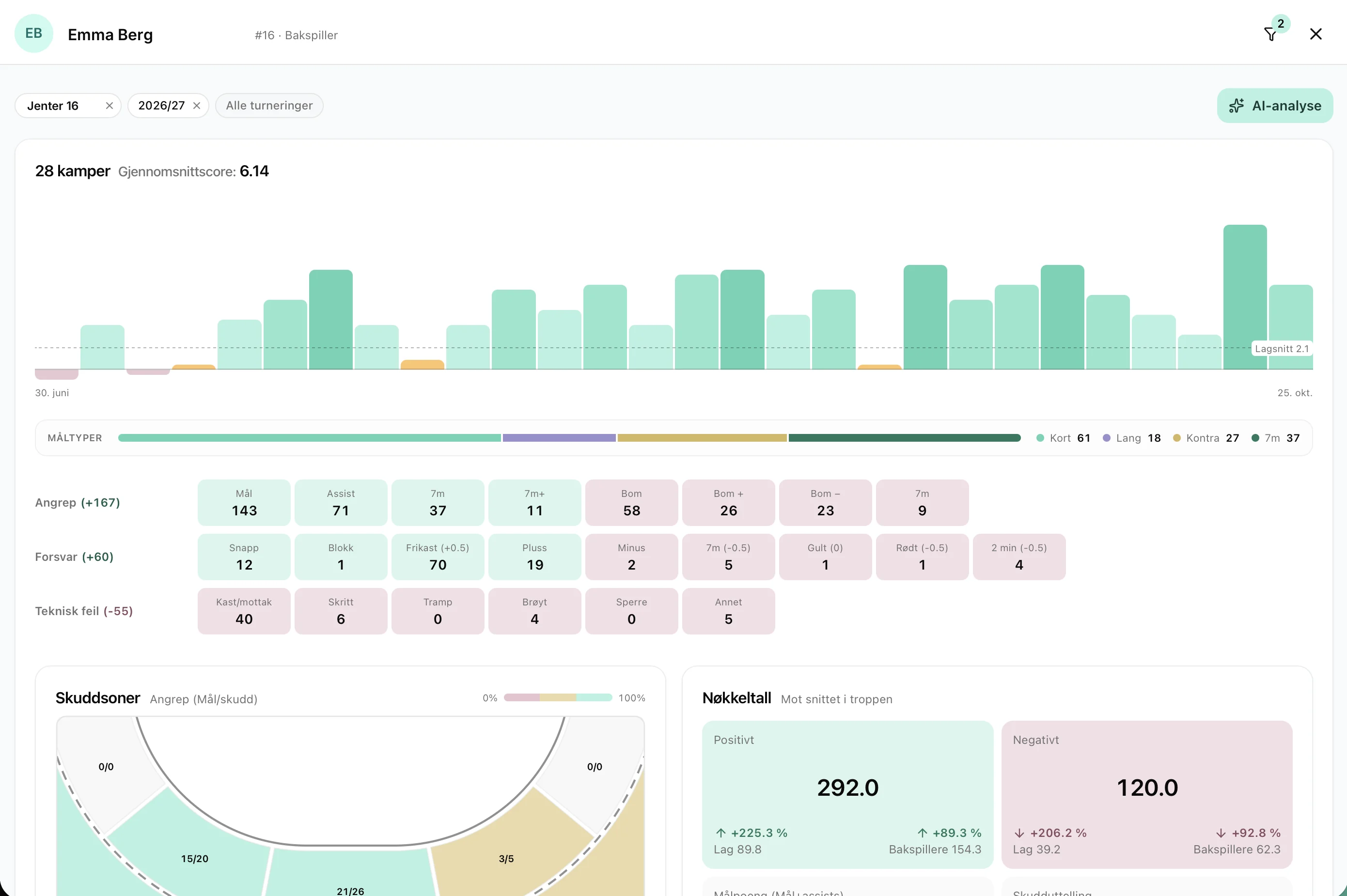
Tap a player name in the squad, on Trends or in the statistics table. That opens the page for that player, with photo, score and the numbers from the matches you have recorded.

Emma Bergโ€™s player page, with score per match as bars and the split of goal types
Matches as bars, with the team average dashed, and the goal types below
  • key numbers show positive, negative, goal points and shot conversion, compared with the team and with the same position
  • the matches are bars. Tap a bar to see that match
  • goalkeepers get save percentage, zones in the goal and earlier analyses
  • the analysis takes position and age into account, and compares shots with what is typical for that kind of shot

The player can get their own code. With it they see the team calendar, the playbook if the team has one, and their own statistics. They do not see the other players. The player uses the numbers to find areas to develop and to follow their progress, not to be ranked. For teams under 16, consider whether the players should see the page, since it also shows negative numbers.

  • turn codes on or off for everyone from the checkbox next to Player code, or for one player in the profile
  • send the code by email, or copy it from the squad

Read more in Player page and player code.

Matches and statistics

๐Ÿ“Š Performance: how the team played

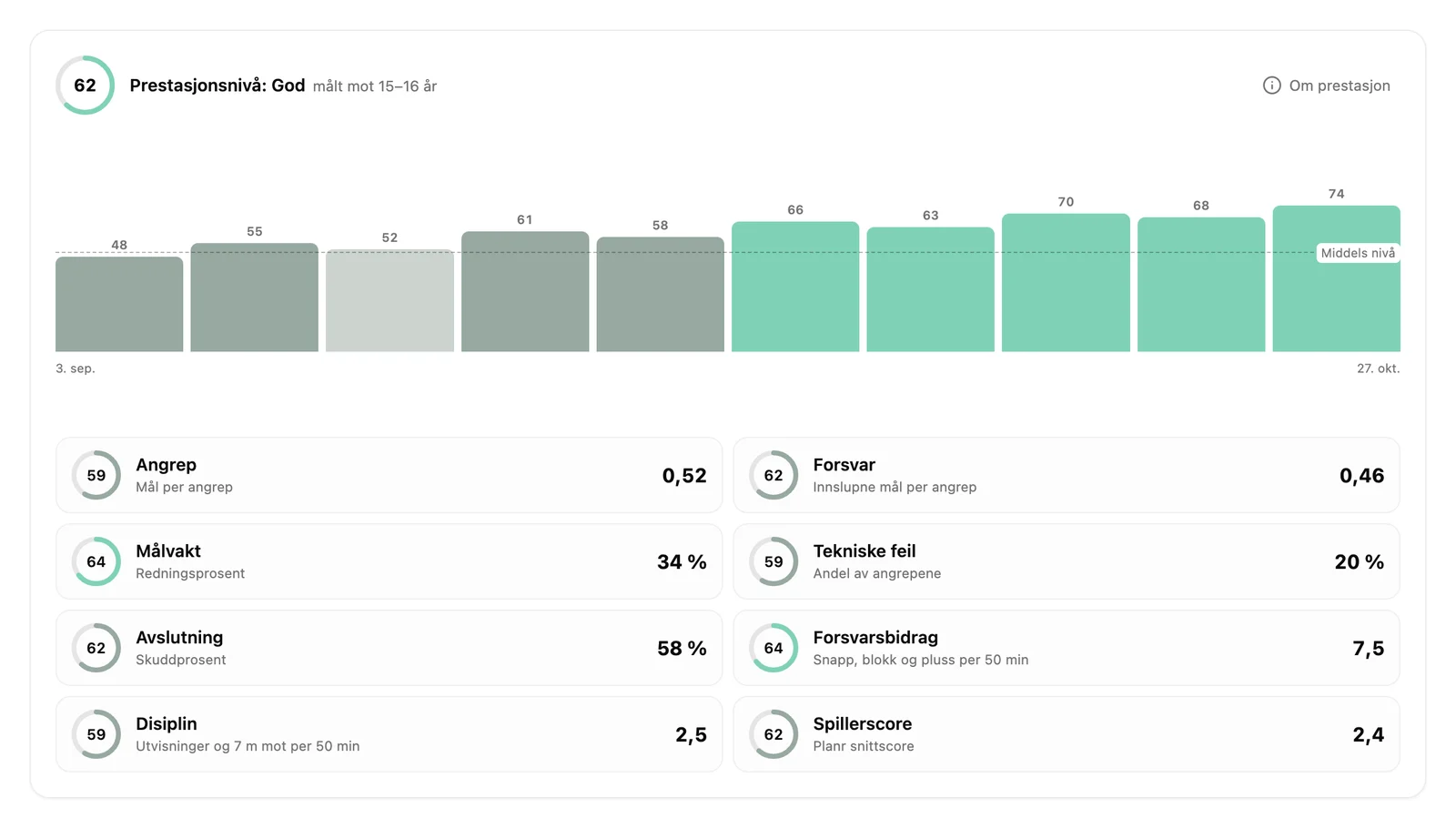
After every match the team now gets a number from 0 to 100 for how you played, measured against what is normal for the age class. The result also depends on the opponent, the referee and small margins. Performance is what you can influence yourselves, and over time results follow from performance.

Performance over time under Trends: one bar per match from 48 to 74, with a score for each part of the game below
Performance over time under Trends, with each part of the game below

The number is built from what you already record. Attack, defense, goalkeeping, technical faults, finishing, defensive contribution, discipline and player score each get their own score, so you can see what pulled the number up and what pulled it down. A narrow loss to a better team can score higher than a weak win.

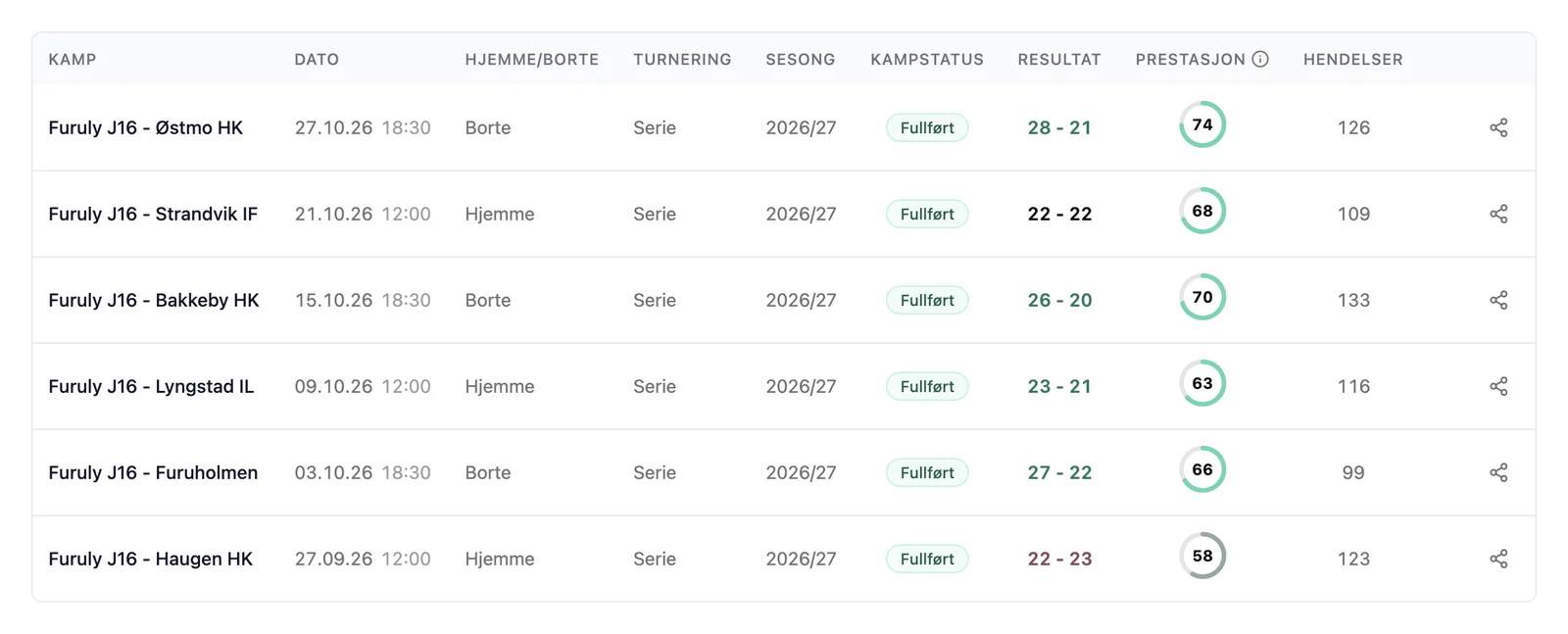
The match list with a performance ring next to the result for each match
Performance sits next to the result in the match list, and by the latest matches on Planr Home

How to get the most out of the number:

  • follow the direction over several matches, the trend says more than the level in one match
  • measure the team against itself, the development shows whether you are getting better
  • see which parts pull the number down, and pick one or two things to work on in training
  • talk to the players about how you played, not about the number

The Trends page has also been upgraded:

  • performance over time at the top, with one bar per match. Tap a bar to open the match
  • the selection is shown as tags at the top, and you remove a filter with one tap
  • key numbers have a new look, with a bar showing the breakdown on every line
  • the playersโ€™ form curves share the same scale, so they are easier to compare
  • leaderboards and player form only show players in the squad

Read more in Season totals and development.

Club admin

๐Ÿ“‹ The sports plan, from plan to practice

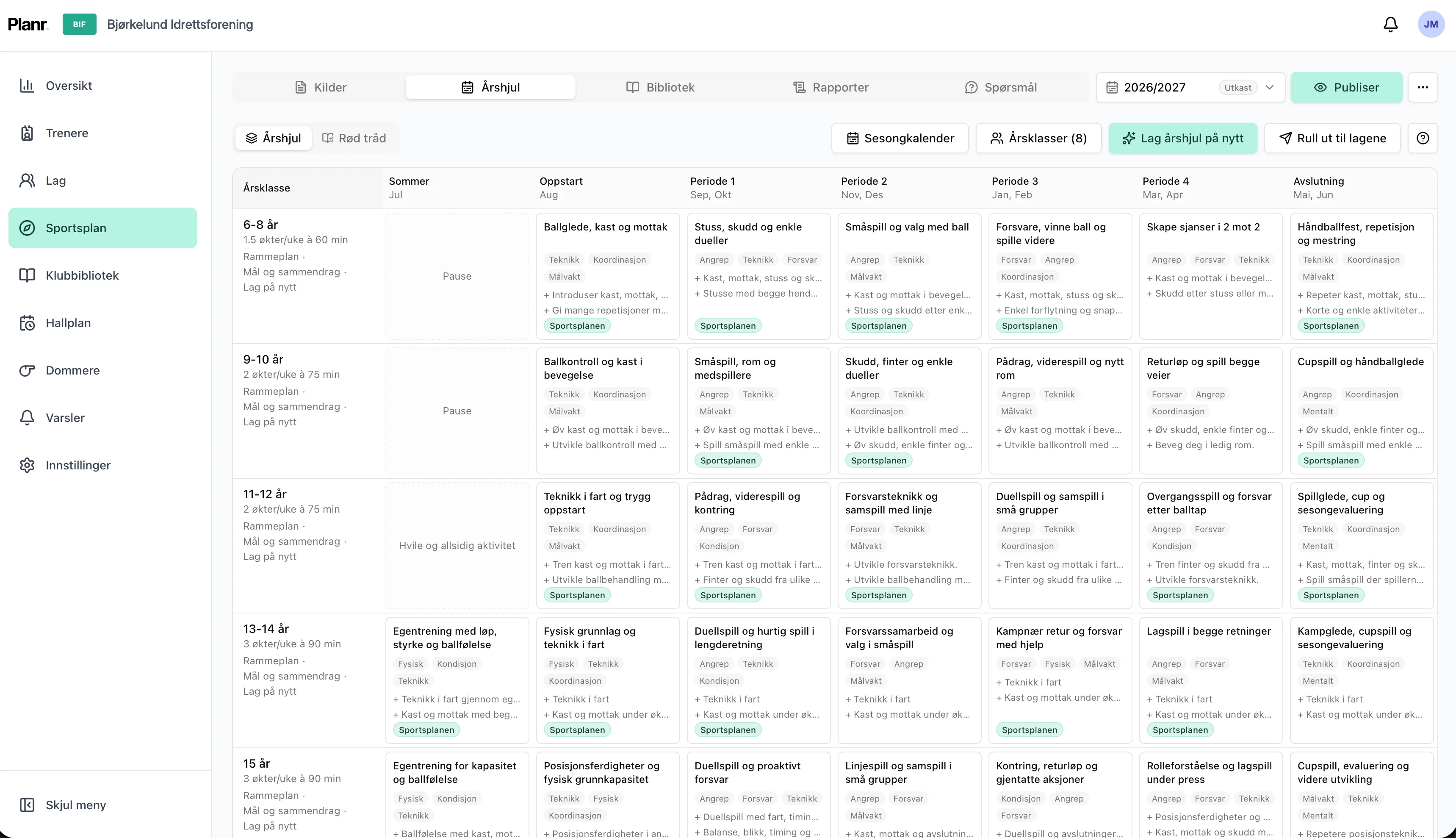
A director of coaching can finally take the clubโ€™s sports plan from plan to practice. The functionality is included with Planr Hub. It is in beta now, but launches any moment. AI interprets the clubโ€™s own plan, uses the NHF development ladder, and suggests a year wheel and monthly themes for every single team. You adjust the suggestions yourselves and decide what gets rolled out, so the plan becomes something coaches work with every week in the hall.

Year wheel in the sports plan functionality, with periods from summer through the end of the season for several age groups
The year wheel for each age group, ready to roll out to the teams
  • upload the club sports plan as a PDF, Word file or link
  • a year wheel for every age group, which you can adjust yourselves
  • roll it out as monthly themes to the teams, without replacing a theme a coach has already set
  • ask the sports plan, and bring drills from the club library into the planning
  • a monthly report for the coaches meeting, and a season review in May
Club admin

๐Ÿ–ฅ๏ธ New dashboard in Planr Hub

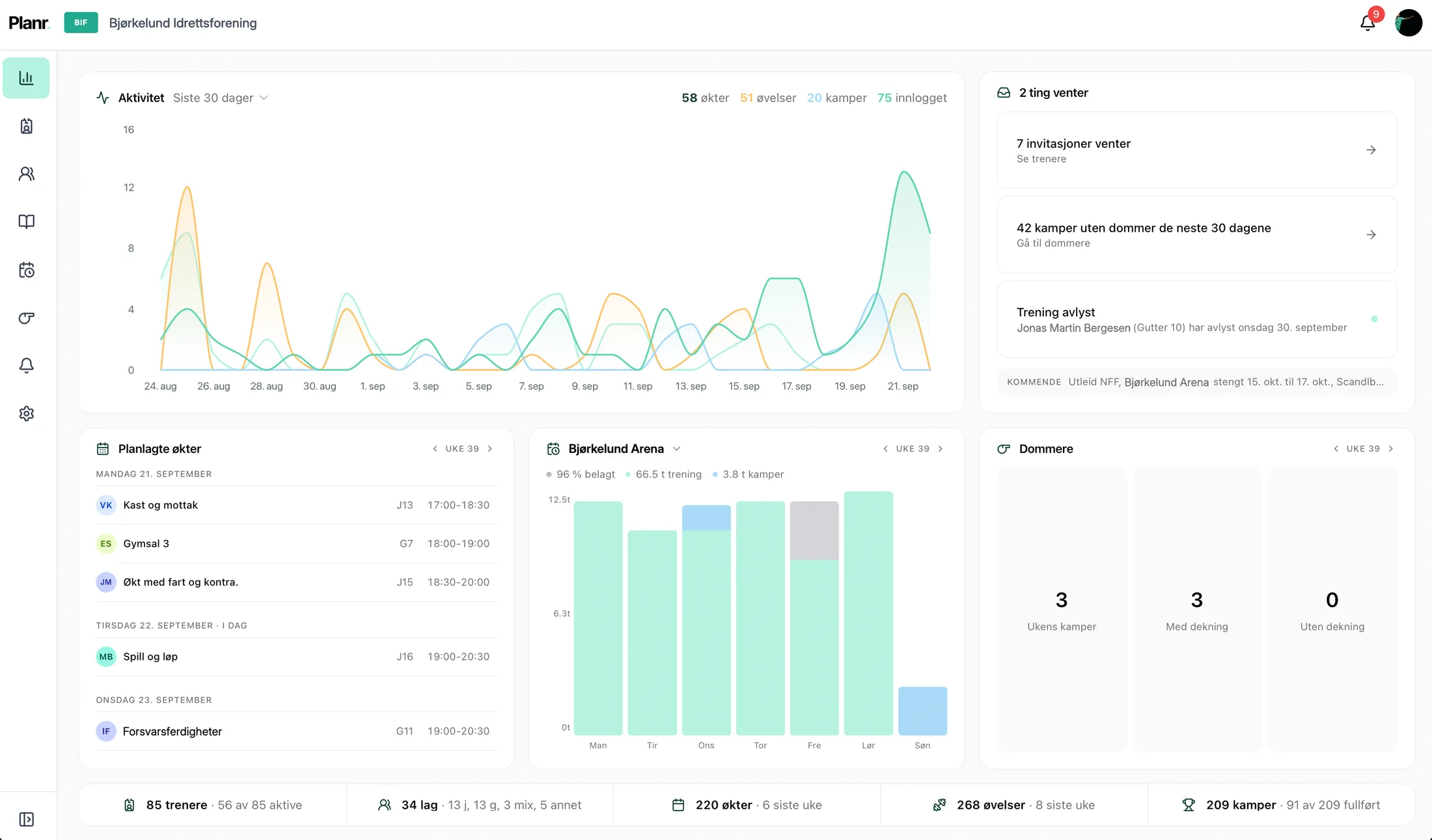
Club admins now get a new dashboard on the Admin home page. It shows what needs follow-up, and what is happening in the club this week, so you do not have to hunt through the rest of admin.

The new Planr Hub club dashboard with activity, follow-up, planned sessions, hall plan and referees
Activity and follow-up at the top, planned sessions, hall and referees for the week below, and the club numbers at the bottom
  • follow-up gathers invites, time requests, matches without a referee and unread notifications
  • activity shows new sessions, new drills and completed matches
  • planned sessions for the week, with time, team and coach
  • hall plan with utilization, training, match and other. Hall name and bars open the public calendar
  • referees show matches, covered and missing, when the module is on
  • a numbers strip at the bottom for coaches, teams, sessions, drills and matches
  • modules that are not on can be activated from the dashboard

The dashboard is on for every Hub club. Read more about club admin in Planr Hub and club operations.

Club admin

๐Ÿ“ฃ Referee administration in Planr Hub

Hub clubs can now turn on Referee administration as an optional add-on. Keep people, matches and payouts in one place, assign jobs, and share the club page and personal code.

  • add people one by one, or paste several from Excel
  • import matches from the venue plan, or add them by hand
  • assign automatically, or set up match by match
  • referees accept or decline, and mark the match completed
  • monthly payouts with rates you set yourselves

Read more in the Referee administration help article.

Matches and statistics

๐Ÿ“Š Shot zones and goalkeeper zones

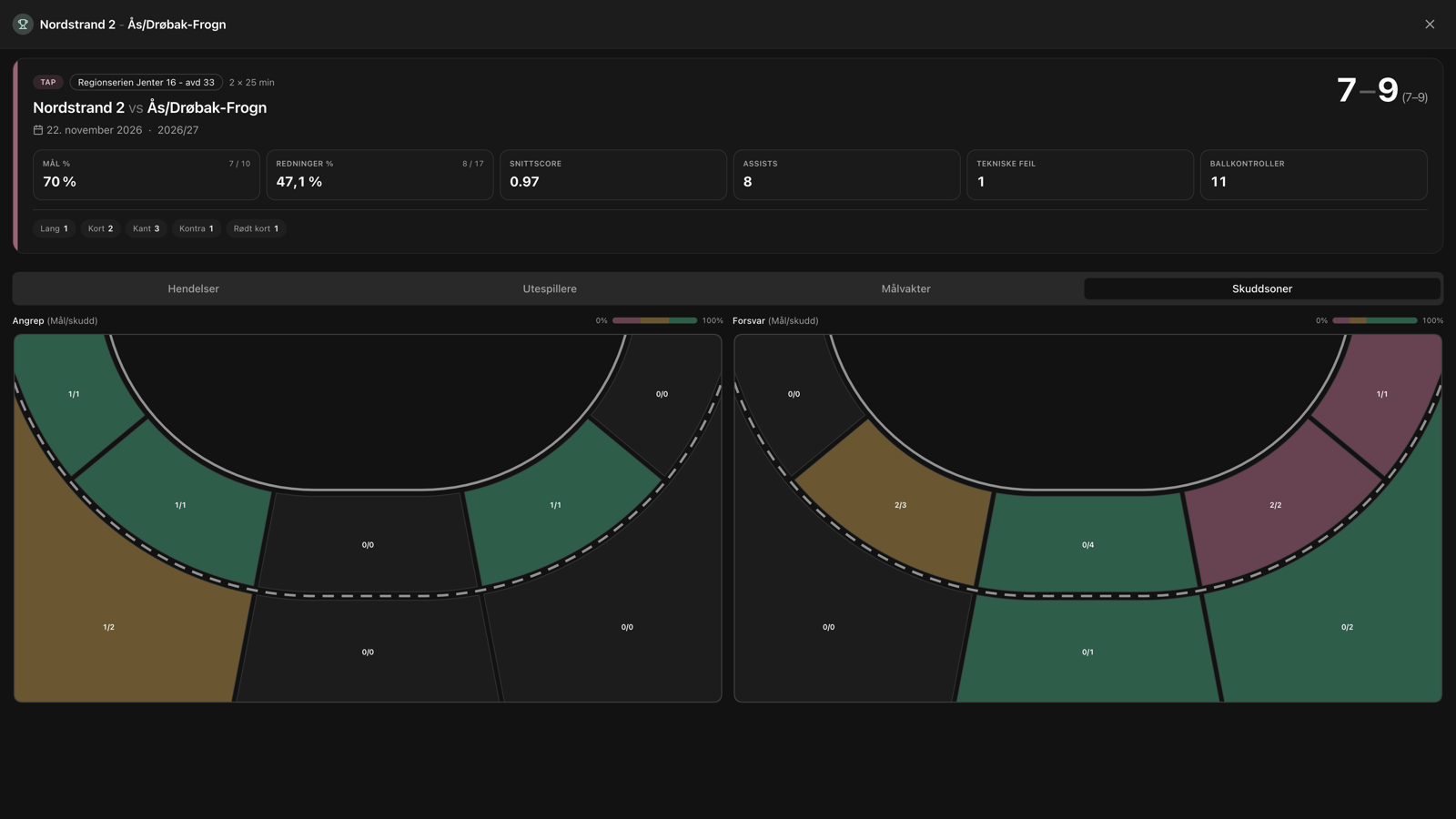
On the start screen, before you tap Start match, you find Shot statistics. There you turn on Shot zones and Goalkeeper zones, and choose which events get a shot zone. The choices are remembered for the next match.

Match summary with shot zones: court maps for attack and defense with hit rate per zone
Shot zones after the match, with hit rate per zone in attack and defense
  • shot zones: court map with eight zones for own goals, Miss+ / Missโˆ’, conceded and saves
  • goalkeeper zones: nine cells in the goal, showing where saves and goals go in
  • heatmaps in the match summary and season view, attack and defense side by side

Read more in Recording a match live or afterwards.

Matches and statistics

๐Ÿ“Š Planr Stats in the App Store: Matches for everyone

Match statistics is now open to every coach. Record matches in Planr, or download Planr Stats: a dedicated app for live recording, squad, trends and season totals.

Live match recording in Planr with shots, goals, technical fouls and live statistics
Live recording on iPad (also works well on mobile)

New since the early launch:

  • Planr Stats in the App Store, with Stats Basic (free, up to 3 matches) and Stats Pro
  • share the match with a view-only link (events only or full share)
  • optional court shot zones and goal zones for the goalkeeper
  • import from handball.no and Profixio, plus match sharing in the team calendar
  • full Matches access included with Planr Pro and Hub

More info in Getting started with Matches and Download Planr Stats.

Getting started

๐Ÿ  Planr Home: a new home screen for coaches

After sign-in you now land on Planr Home: the home screen that gathers the essentials for your team in one place.

Planr Home with next match, upcoming activities, recent sessions, favorites and the team calendar
Planr Home gathers next activity, sessions, favorites and the team calendar in one place

On the home screen you find:

  • next activity and upcoming sessions and matches
  • calendar, favorites and shortcuts to recent drills and sessions
  • monthly themes and yearly cycle for Hub clubs
  • sharing with the team via team code and calendar link, plus usage limits on Basic

Drills and sessions are still at the top of the menu. More about the home screen in Planr Home.

Matches and statistics

๐Ÿ“Š First launch of Matches

In June we launched the first version of Matches in Planr: live recording, squad, trends and season totals. Since then the module has opened to everyone, and Planr Stats is its own App Store app. See the latest update at the top of this page for what is available today.

Live match recording in Planr with shots, goals, technical fouls and live statistics
Live recording on iPad (also works well on mobile)

Read more in Getting started with Matches.

App and accessibility

๐Ÿ“ฑ Lots of new improvements in the Planr app for iPhone and iPad

The Planr app has received a range of improvements this spring and early summer. Here is what matters most for coaches, players and parents using Planr on iPhone and iPad.

The Planr app on iPhone: drills, session planning and running sessions in the hall

Widget and Live Activity:

  • a home screen widget shows the team's next session without opening the app
  • players and parents can use the widget with a team code, without a full Planr account
  • Live Activity on the lock screen during practice, with a quick link straight to the session
  • the widget and Live Activity update when the calendar or sessions change

Sessions, venue plan and day-to-day use:

  • floating bottom bar in the venue plan with week switching, filters and weekend view on mobile
  • better session editor on mobile, with easier drag-and-drop and scrolling behind the bottom toolbar

Don't have the app yet? Download Planr from the App Store and update to the latest version to get all of this. You can find more info under App and accessibility.

Drills and sessions

๐Ÿ“‹ Favorites lists and playbook

Planr now has a new way to collect and share drills: favorites lists for you as a coach, and a playbook for the whole team.

Favorites lists:

Favorites lists in Planr with custom lists such as Playbook, Valg, Duellspill and Forsvar
  • create your own lists with drills from the library and your own drills
  • filter the drill list by an active list when planning sessions
  • drag and drop to sort drills, with sections and an optional description for each part

Playbook for the team:

  • turn a favorites list into the team playbook with match agreements and playing patterns
  • one playbook per team, available to co-coaches and players who sign in with the team code
  • players see the playbook in the shared calendar, with its own tab next to the calendar

From playbook to session:

  • pull drills directly from the playbook into a session when building your training plan
  • personal Pro coaches can also have their own playbook, without a club connection

You can read more about setting up lists and playbook in Favorites and playbook.

Club adminSession planning

๐Ÿข Expanded club admin in Planr Hub

Over the past six months we have expanded club admin in Planr Hub for club administrators, sporting leadership and coaches who need to plan more than one session at a time.

Season and yearly cycle:

  • seasons in the venue plan with a public page for parents and members
  • club-specific school calendar to make planning around holidays and days off easier
  • week labels per season, e.g. winter break or league match

Monthly themes and direction for teams:

  • set a monthly theme per team, with title, description and drill tags
  • sporting leadership gets an overview of themes across teams and can suggest a shared direction
  • themes are translated automatically and can be shown in the shared calendar for parents and players

Training times and venue plan:

  • the training times module is now available to all Hub clubs, not just pilot clubs
  • easier venue planning with drag-and-drop, every-other-week slots and clear ยซavailable timeยป slots
  • coaches are notified when training times change, and requests for available slots can be handled directly from email

Dashboard for club administrators:

Planr Hub dashboard with overview of coaches, activity, shared calendars and shared sessions
  • overview of coaches, teams, sessions and activity across the club
  • charts for activity over time, shared calendars, shared sessions and venue utilization
  • faster loading and a better layout on mobile and desktop

Communication and admin:

  • notifications and announcements to selected teams, in Planr and by email
  • updated admin with better overview, new menu structure and support for five languages

You can find more details in the help center under Club administration.

Collaboration and sharingSession planning

๐Ÿ—“๏ธ Training time scheduling for clubs

Planr now supports training time scheduling at club level.

With this feature, clubs can:

  • collect all training times in one place
  • link training times directly to teams and sessions
  • give coaches automatic overview of their times in Planr
  • handle cancellations and free up court time that other teams can request

The result is better overview, less manual coordination and more efficient use of court time.

The feature is available to Hub clubs. See later updates for further improvements.

Session planning

Support for circuit / station training ๐Ÿš€

After a kick-off meeting with Nordstrand IF, we got the feedback: ยซFor the youngest players we often run station training. Do you support that?ยป. No, we didn't really. And circuit training is something all age groups use too. But it was a great idea! So now we do!

We are launching support for adding stations in the main part of sessions! It still makes sense to include a shared warm-up and cool-down, but in the main part you can now split the session into stations with multiple drills on each station. Thanks for the feedback!

Session planningUser experience

Dual-track sessions โ˜‘

Sometimes you want two drills running in parallel, e.g. wing players on one side and back-court players on the other, or separate goalkeeper drills while outfield players do something else. Now you can do this easily in Planr!

Look for the merge icon at the bottom right of a drill in the session editor and combine the two drills. They will appear side by side and total time is not counted twice!

Planr + Nordstrand IF = ๐Ÿฉต๐Ÿ’™

Nordstrand IF logo

Today we agreed with Nordstrand IF that the club will become our first club customer! The agreement means all coaches in the club will use Planr to plan training sessions, and the club will help Planr test and develop our club features, including sharing between teams and using the club library to secure and professionalize training across the club.

Nordstrand is one of Norway's largest sports associations, and now also one of the most forward-looking ๐Ÿ˜

Planr is live!

We're live! ๐ŸŽ‰

After months of development, testing and fine-tuning, Planr is finally launched: the tool that makes it easy for coaches in youth sports to plan and run sessions, straight from their phone.

Screenshot of the Planr app

You can:

  • Create and save your own drills and sessions
  • Find drills in a growing exercise library
  • Share sessions with others
  • Use AI to plan smarter (Coach and Club)

This is just the beginning. More features, more drills and even better support for clubs and coaches are coming.

Thank you to everyone who has tested and given feedback.

Do you have input or wishes?

We build Planr together with you. Tell us in the chat if something is missing, and it goes on the list we prioritise from.